Search My Thoughts...

Showing posts with label 1080p. Show all posts

Thursday, March 8, 2012

The Post PC World: The Best and Worst of "The New iPad"

The New iPad...

Yesterday at 1:00 pm eastern time Apple introduced "the new iPad". For the most part the iPad's reception has been favorable. Donald Bell, from CNET is absolutely enthralled with the new Retina display.Charles Cooper, again from CNET says "nobody cares what we didn't get". I happen to agree, although there is a part of me that wants to call "the new iPad" the "iPad 2S". Overall, what we received from Apple is pretty much what was rumored - see my recent post to compare the rumors to reality. But now that its here let's take a look at the machine.

What We Did Get

During the Keynote address Apple's CEO Tim Cook made it a point to differentiate the PC-World from the Post PC-World. Apple claims to be leading the Post PC-Revolution with its new iPad; although I am skeptical of the claim the the PC is no longer the center of the digital world and just another device - there are things iPad cannot do that I use my PC for everyday. So how well does the new iPad perform in a Post PC-Universe? Pretty damn good! See the brief video below for the big announcement.


The first thing Apple revealed was its new - and amazing - Retina display! The standard HDTV has a resolution of 1920x1080 or about 2 million pixels. The new iPad has a resolution of 2048x1536 pixels or over 3.1 million pixels! I have not seen the display yet, of course; the release data is not until March 16, 2012. But with that number of pixels on a 9.7 inch screen it has to be fantastic! I am going to buy the machine just for this display, which truly is revolutionary. The display alone is a huge upgrade from iPad 2 or any other tablet on the market. See the video from Apple to see the technology behind the Retina. 

We also received a more powerful processor with the A5X chip, which has quad-core graphics capability. I am not sure how fast the A5X chis is, although I have a hunch that it's still 1GHZ. I am also pretty sure that the new iPad has the same 512MB of RAM that the iPad 2 has. Nevertheless, quad-core graphics is a nice improvement.

Another new feature, which I though was odd given iPhone 4S, is the 5MP iSight camera with 1080p recording. It uses the same optical system as the iPhone 4S, yet it is 3MP less. It has image stabilization, records in 30fps, and has a 5x digital zoom. Not bad for a tablet camera!

The final new piece of hardware is the 4G LTE and 3G-World capabilities (which I did not mention in my last post). This is a really exciting feature if you want to spend an extra $129.00 for the device and spend another $30.00 a month for the 3GB a month data service from AT&T or $30.00 a month for 2GB of data from Verizon. No thanks, I'll stick with Wi-Fi :) (Do you see why I could care less about this feature coming to the iPad? I pay enough for my freaking iPhone data plan as it is.) Although I am impressed that Apple was able to keep the same battery life with the addition of next generation broadband cellular.

We also received a new microphone with the new iPad along with voice dictation (this will be amazing, if it works - is you watched the Keynote, you may have noticed there was no on stage demo like there was with Siri, this could mean the technology isn't as reliable). 

Apple also released a bunch of new Apps for the iPad, which I am not going to reiterate here. The bottom line is simple: if you have been waiting to buy one, now is the time; if you already have one it might not be enough to spend another $499.99 in less than two years (or one year is you have the iPad 2). 

Even though the new iPad is a revolutionary device at the same remarkable price point, there are a few things missing.

What We Did Not Get and Should We Care?

The first thing that struck me was no Siri! When Philip Schiller announced the new voice dictation feature, I was positive that the next words out of his mouth were going to introduce Siri for the iPad... that didn't happen. However, with the microphone and the hardware specs I think that Siri is on its way to the iPad. This summer Apple is likely to introduce the next generation iPhone and with iOS6. I think there is a pretty good shot that Siri comes to iPad at this time. Thus, I am not too disappointed that Siri wasn't offered with the new iPad... just yet.

I was, however, disappointed that the device - outside of the display - was not more powerful overall. I was hoping for 1GB of RAM and a more powerful processor, even if it wan't quad-core. Yes, I know that the graphics chip is quad-core - that's awesome! But I have a feeling the processor is still 1GHZ (this spec is not yet mentioned here on Apple.com). But, in the end, I don't think this matters for the new device. The iPad 2 is mega fast and I am sure the new iPad will be as well. 

The 5MP camera is a let down. The iPhone 4S has a better camera than the new iPad! However, I don't really plan on taking my photos with my iPad (I am sure many people agree with me); in fact my phone is really my first option when I am out and about and want to capture video and pictures. Moreover, with iCloud I can take my pictures and video with my phone and edit them on my gorgeous Retina iPad display. Thus, the fact that the new camera is better is enough for me. It still seems weird though that they couldn't just place the iPhone tech in the iPad? But what do I know, I am not one of their engineers... We also didn't get an improved front-facing camera - it remains the 0.3MP VGA quality - but really this is only used for Face-Time and who needs to look at my face in high resolution!

Of course, being the geek that I am, I wanted a bigger screen, flash support, a new iOS, better hardware, Siri, and longer battery life - but really I know that my wants and desires are much higher than actual expectations! The new iPad is a magnificent improvement and critics shouldn't be quick to point out what is not in the new device. I recall that after the iPhone 4S release there was a lot of talk about what that product was lacking, yet the device has been Apple's best selling phone yet. The new iPad is going to make a huge impact on the tablet market! 

The fact of the matter is that Apps are better for iOS and they will now look better on the Retina display with the more powerful graphics chip. Apple Post-PC portable devices are the best on the market. Android is a great operating system. It does a lot of great things and does them well. But nothing compares to the beautiful and easy to use iOS. In fact, the more I use Apple's portable devices, the more I want to buy a Mac... but I won't... Why? See here.

The Bottom-Line... Buy One!

I will be purchasing the new iPad! I am not sure if I will buy it on March 16 - I don't have the time to wait in line all day (unlike the people in those Samsung commercials, I have things to do). But I will pick one up early in the product cycle. My biggest fear in buying a tablet is that it will be out of date in only a year - and it will! I am not worried about my phone because I get one every two years and they are relatively cheap (if you sign your life away with a 2-year contract). Bu the tablet is much like a PC purchase, it's going to be with you for a few years (unless you have unlimited wealth, then just buy one every year - I do not). 

In the end I am impressed enough with the upgrade from iPad 2 to make the buy. I know that this time next year I will want the new device - that is a curse I must live with. In fact, if "iPad 4" good enough I'll give the old iPad to my fiance and buy the new one for myself :)

Yes... I am excited! I will be sure to let you know about my experience once "the new iPad" is in my possession.

Tuesday, February 28, 2012

iPad 3 March 7th Event!

Apple has finally announced its iPad (2S or 3?) event! I have been waiting for this announcement since the release of iPad 2. The primary reason I waited for the next generation iPad is the (very probable) introduction of the Retina Display which is currently utilized on the iPhone 4 and 4S. Apple's Retina Display is rumored to have four times the number of pixels as the current model. Apple will also probably boost up the rear-facing camera with its 8MP model currently used in the iPhone 4S (this would give us a boost from 720p recording to 1080p recording!).


What else may we expect from Apple?

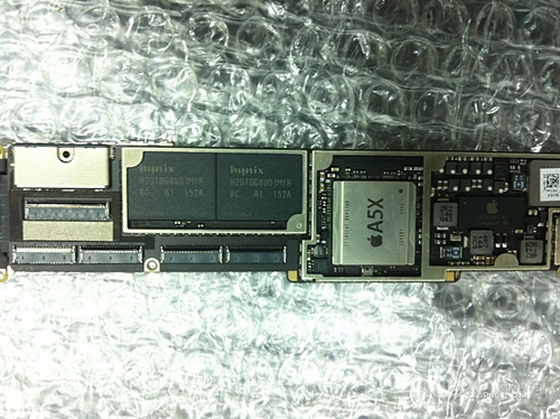
I would really like to see a next generation processor worthy of the A6 title. However, rumor has it (with photo evidence you can view bellow) that Apple will release an A5X chip, which will remain duel-core. Earlier rumors claimed that Apple would introduce a quad-core A6 chip for the next generation iPad.


Personally, I don't care if Apple releases a version with a smaller screen. However, I would love to see a larger 10" screen rather than the 9.7" screen the current models have. Of course it should have more memory as well. The iPad 2 only has 512MB of ram; I would really like to see an upgrade to 1GB! With the new display I would like to see an upgrade to the current PowerVR SGX543MP2 graphics chip as well. Of course it will also have Siri. It may also have Gorilla Glass, which would be awesome! Finally, and the least probable (not a shot in Hell), I would love to see Flash brought to all Apple devices with OS5 upgrade. That is truly wishful thinking, however :( 

What might I not want in the new iPad?

One thing that has been rumored is that Apple will release iPad with a smaller dock connector, which in my opinion would be terrible, as older accessories would be obsolete for your new device. That is pretty much the only thing that I wouldn't want to see in the new iPad. Although there was a rumor that the new model will not have a home button - but that rumor was based on a picture of the new device in portrait mode (see below). Thus, the home button would not be visible in the photo. 


Overall, the Apple community is really excited and so am I! I have waited to buy an iPad for a long time and I hope this model will be worth my wait. I will be sitting near my computer on March 7 waiting for the event to hit the Apple website (and reading a live feed). For the iPhone 4S event many websites "claimed" to have a live feed, when in reality it was just a few kids talking and blogging speculative information as the event proceeded - not even cool. If you can't wait to watch it (like myself), I suggest reading about the event live from Gizmodo's website. For the iPhone 4S even they ran a wonderful live text feed from inside the presentation. Until then, there is plenty of time for lots of wishful thinking within the rumor mill. 
"Well, everybody's heard iPad stories around the campfire. Heck, my grandma used to spin yarns about the iPad 3 that would rocket past the farm where she grew up!"
Do you know where I adapted this quote from? 

Friday, February 10, 2012

Plasma vs. LCD vs. LED

Plasma vs. LCD vs. LED

I know there is an enormous amount of information on the Internet regarding this subject, with thousands of Blog Posts taking up space on servers everywhere. Even so, the first thing a customer asks me when they are looking to purchase a new television is:

"What's better, Plasma, LCD, or LED?"
or the infamous:

"What's the difference between LCD and Plasma?" 
So, even though there is a plethora of information about the topic, people still ask this (rather annoying) question. This post will offer an answer without a lot of technical information. In other words, I'll spare you the geek talk and give you some practical information for purchasing a new TV.

General Criteria

First let's set out some general criteria for purchasing any of the current technologies. First get a 1080p television. You may encounter the classic part-time sales person that says, 
"You don't need 1080p, you can't really tell the difference between 720p and 1080p unless you are watching a Blu-Ray disc and how often do watch those? Do You even have a Blu-Ray player?"
Ignore this person and walk away. There is a significant mathematical difference between 1080p and 720p. Specifically, 1080p is 1920x1080 pixels, while 720p is 1280x720 pixels. Most over-the-air broadcasts are in 1080i - the i stands for interlaced and the p stands for progressive. Progressive scan technology literally scans the entire picture line by line every sixteenth of a second, while interlaced scanning divides the horizontal lines of the television into odd and even lines and then alternately refreshes them at 30 frames per second. The second number in the pixel aspect ratio indicates the horizontal lines. Thus, a 1080i scan will be 540 odd and 540 even. Now on a 1080p television all 1080 horizontal lines will be there. However, on a 720p television there will only be 720 lines, thus a 360 odd and 360 even split. Whoops, we just lost about 360 lines of resolution! If your following the logic, only a 1080p television set can produce full resolution pictures on all types of scans - interlaced and progressive. So stick with a 1080p set (no matter what the technology). Especially if you are purchasing a TV 40" or larger, do yourself a favor and buy a 1080p set (your eye cannot really tell the difference below 40"). Now, from resolution to speed.

Early LCD televisions had severe problems with what is know as response time. Response time is the amount of time a pixel in an LCD monitor takes to go from one value to another and back again and is measured in milliseconds (ms). The higher the response time, the slower each pixel is to change and thus the higher the lag on your television set. I have an old 26" Sharp Aquos from 2003 (or maybe 2004) with a response tome of 8ms. When I watch a football game on this set all I see are squares and lag lines (artifacts which are a result of its slow response time). The set lags terribly! Response time and refresh rate are different and most LCD/LED screen have ultra fast response times in today's market. Refresh rate is not response time but it is still important.

I suggest that you buy a television which has at least a 120hz refresh rate. Television is recorded in 24hz   (frames per second) and unconverted to 30 frames per second. (fps) This is know as 3:2 pull down. The process is used to transfer film which runs at 24fps to 30fps to match you television's interlaced scan (progressive scan makes a huge improvement on any video). The frames are then combined and interchanged to get 60hz. So why so we need 120hz if the image is actually being presented at 60hz? The answer is that companies have developed advanced algorithms which are able to smooth the picture out better than the standard 60hz, by producing frames in-between frames, which already exist. They are not adding any more detail, but they are making the conversion easier on your eyes. TVs with 120hz or above  (although anything over 120hz does not significantly add to the picture quality and hikes the price up unnecessarily) produce a picture which is substantially more smooth than TVs at 60hz and most people can tell the difference.

These are the two criteria that I think every TV purchase should include. Now let's get to the different technologies.

Plasma: Pros and Cons

Don't let the myths about Plasma TVs prevent you from considering this technology! Plasma TVs have no issues with speed - most run at 600hz per sub-pixel and response time is irrelevant. Football, basketball, hockey, the explosion in space - it will all be smooth with a Plasma. Black levels will be amazing - no strange back-light bleed through to worry about. Color reproduction will be accurate and the colors will be rich and deep. Most plasma sets have 100,000 to half-life, meaning that you will get about 40 years of viewing at 6 hours a day! These sets do not need to be re-charged or refilled (I don't even know where that rumor started, nor do I care). In fact, these are awesome TVs, especially from the brand Panasonic. Most importantly Plasma has a huge advantage in PRICE! The technology for Plasma sets has been around longer and the manufacturing process is cheaper, allowing you to get more "bang for your buck". This can mean a difference, for two sets with the same specs, of just under $1000.00 in some cases - plus you can get larger Plasma sets for the price of some smaller LCD models (i.e. a 46" LCD will be the same price - sometimes higher - as a 50" Plasma). 

There are a few cons. First, these TVs have a thick glass screen which can produce glare (however, most LCD TVs now have a super-glossy screen anyway, so if you have a glare problem it's hard to get away from in some cases). Second, the color pallet for whites is not as pure as on an LCD or LED TV. In fact, shades of white can look rather grey, milky, or even purplish on Plasma screens - it can be annoying. Next, plasma screens are not as bright as most LCD / LED televisions; but really this doesn't matter when the TV is in your house and not side-by-side with 15 other TV models that are all on the "dynamic" picture setting. I am always amazed by the customer who says, "but that TV is brighter and I like bright", not bothering to look at the picture quality. Finally, and most importantly, Plasma screens still experience burn-in. Burn-in occurs when a static image is left on the screen for hours at a time - I have recently witnessed this occur with a static image which was left on a brand new Plasma for only 4 hours! Thus, if you watch Fox News, ESPN, or MSNBC religiously and they have that stock / news ticker on the bottom of the screen, it will become a part of your screen (it actually looks like a dark shadow which will become most noticeable when lighter images are on the screen). Moreover, the scroll bar "fix" (this black and white interchanging bar that just rolls accross the screen for hours in hopes of removing the burn-in) does not work, so don't bother using that feature at all. Burn-in will eventually fade out, but it takes a really long time. 

The conclusion here is that Plasma sets actually have a fantastic picture with rich colors, dark blacks, and super smooth images. Plasma is still a viable technology for anyone interested in buying an HDTV. But BEWARE, Plasma screens are still sold in the 720p resolution - LCD and LED TVs are not sold with this resolution in larger sizes anymore. Buy 1080p unless your really care less about resolution and are just looking for the so called "basement TV".

LCD and LED: Pros ans Cons


Liquid Crystal Diode displays and Light Emitting Diode based displays are essentially the same thing, except that LCD displays use fluorescent lamps for illumination, while LEDs use light emitting diodes to illuminate the TV. Liquid crystal technologies do not produce light on their own (like Plasma TVs which burn phosphors) so they must be back-lit. LCD have come a long ways since they were introduced. They are very bright televisions with most florescent bulbs putting out around 80 lumens (most plasma sets can produce around 3 lumens). But as I already said, this may not be a significant advantage. LCDs and LED also have very good color reproduction in today's models, not so much in the past. LCD TVs have also corrected the issue with response time, yet LCD TVs are still slower than Plasma models. Moreover, as long as the LCD or LED has 120hz motion technology, it will have a smooth picture. LCD TVs are also lighter and have more diverse mounting options; Plasma screens are heavier and require a two-stud mount, but most LCD TVs are light enough to use one-stud full swivel mounts. LCD televisions tend to have more depth than Plasma sets, meaning that the pictures are much more vibrant under normal conditions, especially on static images. Finally, LCDs with a "matted" screen eliminates nasty glare; this only applies to LCD sets without the glossy screen, some LCD / LED sets have MORE glare than any Plasma and some Plasma TVs have an anti-glare coating which makes them as good as any matted LCD. Another advantage is power consumption. LCD sets utilize less power than plasma sets because the technology needs less power to operate. Moreover, the LCD and LED TVs generally have a higher native resolution than Plasma, which will still offer a range of 720p sets. As mentioned before, still images look amazing on LCD and LED TVs; thus they are much better for use as a duel TV / Computer Monitor.

There are a few cons. First black levels on most LCD TVs can be improved. The contrast ratio tells us the ratio of the luminance (a measure of the intensity of light) of the brightest color white to the darkest color black. Just because a TV is brighter than the rest does not mean it has a better contrast ratio. Plasma sets produce very dark blacks and thus can reach very high contrast ratios without having to be super bright. LCD (we will get to LED shortly) sets are back-lit with fluorescent tube lighting and have the tendency to allow light to bleed through, preventing perfect blacks (which will affect the dark colors on your set). Thus, LCD sets have trouble presenting true blacks which are important for overall picture quality. The viewing angle on an LCD (because it is back-lit) is only 178 degrees, rather the full 180 degrees of most plasma sets. Thus at the extreme viewing angles the picture on an LCD can be distorted. LCDs and Plasma sets have similar life spans, thus there is no real difference in this category. Plasma sets have burn-in (which is not permanent), but LCDs also have their idiosyncratic issue called "defective pixels" or the "dead pixel effect". A defective pixel is literally a pixel on an LCD / LED screen which either never shows light or always shows light - essentially it is static and never presents an image leaving a small point on the screen which never changes. I hate these little monsters! Imagine you are watching a Star Trek movie where the Enterprise is about to kick in to warp drive. The image on the screen shows the Enterprise in deep space... wait what it that thing in the middle of the screen?... Is it a star?... No it's a neon green defective pixel that you are just noticing for the first time because a dark image is on the screen. Now whenever you look at your set you will see that neon green bastard. Worse, you call the manufacturer and they tell you that they will not cover this defect under the one-year limited warranty unless there are 20 or more defective pixels in a cluster on the screen - otherwise they don't consider it a "defect". That is the truth of the matter and I know several customer who went through this nasty scenario. By the way, most "extended warranties" only extend the manufactures warranty and will not cover this issue.

Speaking of "extended warranties" do not buy one on an LCD unless it covers 1 or more defective pixels! LCD sets require very little maintenance and outside of the defective pixel issue, these TVs are generally stable. The only major issue is the defective pixel so if the extended warranty covers this issue, you might want to go for it. You have to replace the entire LCD panel to fix the problem and that costs about 80% of the value of the TV. The same goes for Plasma, if they cover burn-in, it may be a decent deal. However, some Plasma sets do have substantial cooling systems which should be occasionally cleaned. If the extended warranty offers preventative maintenance (PM) checks or cleanings it may be worth it. I am not advocating for the "extended warranty" by any means, but in some cases - if the cost is low enough - it could be worth it. In most cases it's not worth it at all. Think about it in terms of expected value and probability theory.

Let's say for the sake of argument that 10% (a high estimate) of TVs like the one you are going to buy will require a repair 2, 3, or 4 years (not per year) after the initial one year warranty. Let's say that the extended warranty costs $150.00 (most cost more) for 3 years additional coverage beyond the manufacture warranty (usually the extended warranty subsumes the manufactures, but I'll give them the benefit of the doubt in this example). Let us further assume that the average repair costs is about $300. Thus, 10% of the time we would have a $300 repair three years after the manufactures warranty expires and the extended warranty costs us an initial $150, while 90% of the time we would not need a repair in four years and the warranty still costs us $150. Let's do the math to find the expected value of the extended warranty: .10(300-150) + .90(-150) = .10(150) - 135 =  15 - 135 = -120. Thus, on average a customer should expect to lose $120 on the purchase of the extended warranty - and keep in mind that I chose a percentage of defection that is rather high. The point of this exercise is to demonstrate that generally risk adverse people (who are scared or pressured by the salesman) purchase these warranties. Now, of course, if the warranty offers additional services beyond repair (like PM checks and cleanings) it might be worth it because it is possible for the warranty to "pay for itself". For example, if a PM check costs $100 a year and the warranty costs $300, and you use all your PM checks, then it has paid for itself. Or if the warranty covers high probability repairs which cost a lot to fix (like defective pixels) it might be worth it. It's your call!

All LED Technology Is Not Created Equal

LED sets are LCD TVs with a different back-light - they use Light Emitting Diodes rather the Cold Cathode Fluorescent Lighting. They are thinner, lighter, and have more versatile and slim-fit mounting systems. There are generally three types of LED lighting patters: (1) Edge-Lit; (2) Full Array; and (3) Dynamic Clusters. The most common type is Edge-Lit, which means that the TV has LED around the edge and that light is diffused throughout the rest of the TV and is also the most useless advertising mechanism to inflate price - yes these LED sets do not provide any advantage over LCD sets, except maybe slightly purer whites. The advantage of LED rests in the "local dimming" feature of Full-Array and Dynamic sets. When a TV is a full array LED, this means that each diode is independently controlled and thus certain areas of the screen can be dimmed to achieve more balanced blacks and ultimately higher contrast ratios. Edge-Lit sets do not have local dimming. Dynamic cluster, while not as good as Full-Array, do have the ability to dim clusters of diodes and thus improve picture performance. Thus, Full-Array and Dynamic Cluster LED sets are worth the extra cost, while Edge-Lit LED sets do not actually improve the picture quality in any substantial way, other than to make colors slightly more pure. Moreover, in some cases Edge-Lit LED TVs can have more light distribution problems because they tend to be brighter at the edges! Don't be fooled, not all LED sets are created equal.

A Brief Word on 3D

There are generally two types of 3D televisions: (1) Active and (2) Passive. 3D works by tricking your eyes to see two slightly different images. Active 3D technology uses glasses equipped with little LCDs (that generally cost $149.00!!) to dim (not block) right and left images in succession to trick your eyes. These glasses have to communicate with the TV via an inferred sensor and need batteries to operate. Why anyone would buy this technology is beyond me! For a family of 4 to watch a single 3D movie they have to make an initial investment of $450 (the first pair are free). The price of your new TV just went up by almost 1/3 of the cost of most 50" screens. Do the movie theaters spend $150 on their 3D glasses? NO, because they use Passive 3D technology. Passive 3D works by using a special pair of polarized glasses which are designed to block specific types of light emitted by the TV. Thus, the TV does all the work and the glasses don't need batteries and cost about $10.00. But, technically, since the glasses are blocking (not dimming) out light you are not getting the full 1080p resolution with the passive technology. Nevertheless, I have seen both operate and the Active 3D is not that much better (if at all) than the passive 3D - it is definitely not worth the extra $450 (as most Passive sets come with 4 pairs of glasses upon purchase). 3D is cool and it will get better over time, especially because actual broadcast television swill start to utilize the technology, but right now it should not make or break your decision on which TV to buy (unless of course you really care about this feature - it's subjective); but I would never buy an active 3D TV since the future of the technology will be  most likely be Passive. 

Conclusion

All three types of TV sets are viable technologies and you should consider all three when purchasing a TV. They all have pros and cons to look out for. In fact, I own all three types (plus a rear projection LCD which I am not going to bother to talk about because no one sells them anymore, albeit in the largest of the large sizes and even then front projection is better. There was also DLP technology which suffered the same fate as Rear projection LCD). If you have a budget constraint I think Plasma sets give you the most for the money. If you have a huge budget, Full-Array LED TVs are great but so are THX certified Plasma sets. I am not going to crown a winner but I should have given you enough information to make up your own mind. Happy TV Hunting!